Seeing “No SIM card”, “SIM not detected” or “Invalid SIM” on your phone? Without a working SIM, you cannot make calls, receive OTPs for banking and UPI, or use mobile data. The SIM card not detected problem can be caused by a loose SIM, dust in the tray, network settings, a software glitch, a deactivated SIM or a damaged slot. Most causes can be fixed at home in minutes.
This guide gives 12 easy fixes for SIM card not detected on Android and iPhone, explains eSIM issues, and tells you when to get a replacement SIM or visit a service centre.
SIM Card Not Detected: Quick Diagnosis
| Symptom | Likely cause | First fix |
|---|---|---|
| “No SIM” after a fall | SIM moved or tray bent | Reinsert SIM, check tray |
| SIM works in another phone | Phone settings or slot issue | Restart, reset network settings |
| SIM fails in every phone | Damaged or deactivated SIM | Get a replacement SIM from operator |
| Only one SIM slot not working | Slot or settings for that slot | Swap slots, check SIM settings |
| “Invalid SIM” after travel | Network lock or roaming setting | Check carrier lock and roaming |
| Problem after update | Software bug | Restart, update again, reset network |
12 Easy Fixes for SIM Card Not Detected
1. Restart the phone
A restart reloads network services and often makes the phone detect the SIM again.
2. Toggle Airplane mode
Turn Airplane mode on for 10 seconds and then off. This resets the radio connection.
3. Remove and reinsert the SIM
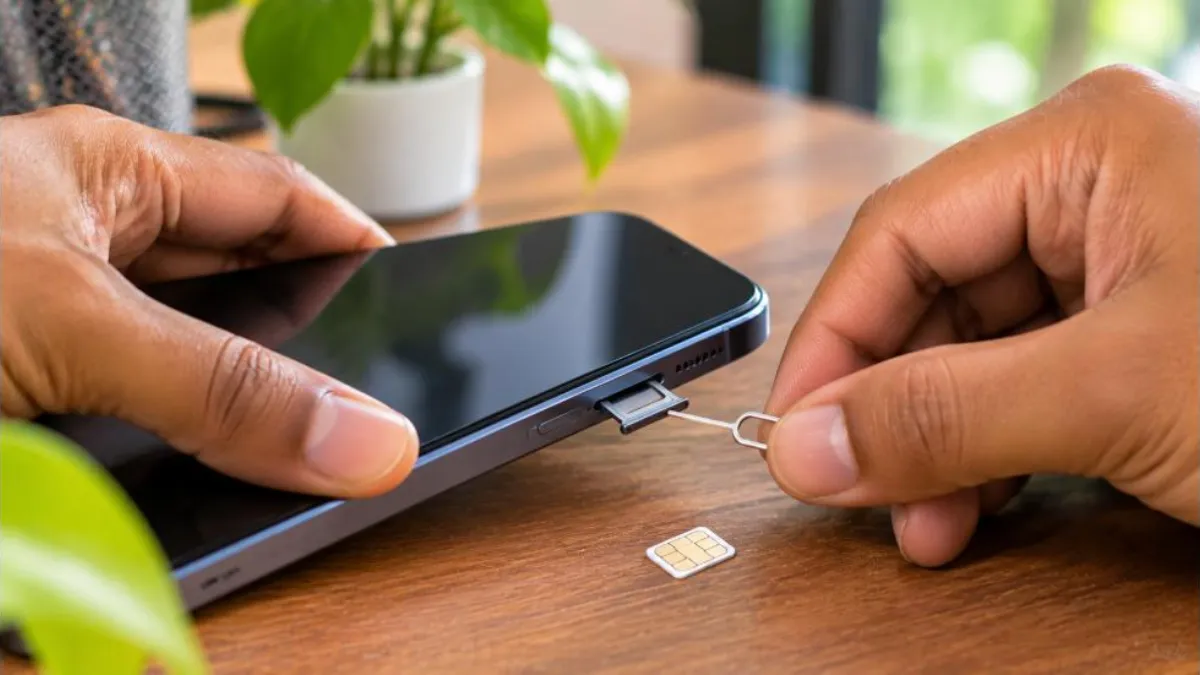
Switch off the phone, use the ejector pin to remove the tray, take out the SIM, check it is placed correctly (notch aligned) and reinsert firmly. Even a slight shift after a fall can cause the SIM card not detected error.
4. Clean the SIM and tray
Gently wipe the SIM’s gold contacts with a soft dry cloth. Blow out dust from the slot. Do not use water, liquids or sharp objects.
5. Try the SIM in another phone
If the SIM works in another phone, your SIM is fine and the problem is with your phone. If it fails there too, the SIM is likely damaged or deactivated.
6. Try the other SIM slot
On dual SIM phones, move the SIM to the second slot. If it works, the first slot or its settings may have a problem.
7. Check SIM settings
On Android, go to Settings > Network & internet (or Connections) > SIMs / SIM manager. Make sure the SIM is enabled and set for calls, SMS and data as required. On iPhone, go to Settings > Mobile/Cellular and check that the line is turned on.

8. Select network automatically
In mobile network settings, turn on “Select network automatically”. If you manually chose a network earlier (for example while travelling), the phone may not register.
9. Change preferred network type
Set preferred network to 5G/4G/3G/2G (auto). Some older SIMs do not support 5G or VoLTE properly; switching to 4G may help. If your operator requires a 4G or 5G compatible SIM, upgrade it at the operator store.
10. Reset network settings
On Android: Settings > System > Reset options > Reset Wi-Fi, mobile and Bluetooth. On iPhone: Settings > General > Transfer or Reset iPhone > Reset > Reset Network Settings. This clears saved networks and Bluetooth pairings but does not delete personal data.
11. Update software and carrier settings
Install system updates. On iPhone, a carrier settings update prompt may appear in Settings > General > About. Bugs in older software can cause SIM card not detected errors.
12. Contact your operator for a replacement SIM
If the SIM is old, damaged, or not working in any phone, visit your operator’s store with ID proof for a replacement SIM. Your number stays the same. The operator can also confirm whether your number was deactivated due to non-recharge, KYC issues or other reasons.
SIM Card Not Detected After Water or Drop Damage
Water can corrode the SIM slot contacts, and drops can bend pins or the tray. If the SIM card not detected problem started after such an incident and the SIM works in another phone, visit an authorised service centre. Do not try to bend pins yourself.
eSIM Not Working
Many new phones support eSIM, a digital SIM without a physical card. If your eSIM stops working:
- Check that the eSIM line is turned on in SIM settings.
- Restart the phone and toggle Airplane mode.
- Do not delete the eSIM profile unless your operator instructs; you may need a new QR code or activation.
- Contact the operator to reissue the eSIM if needed.
Is Your SIM Deactivated?
Operators may deactivate numbers after long periods without recharge or due to incomplete KYC. Prepaid users should recharge regularly with at least the minimum validity plan. If your number was deactivated, the operator store will explain whether it can be restored. You can also check all SIMs registered in your name on the Sanchar Saathi portal; see our guide to block lost mobile phone (CEIR) for related services.
Network Lock (Carrier Lock)
Phones bought from certain carriers abroad may be locked to that carrier. An Indian SIM will show “Invalid SIM” or “SIM not supported”. Contact the original carrier to unlock the phone. Most phones sold in India are unlocked.
Brand-Specific Tips
| Brand | Where to check SIM settings |
|---|---|
| Samsung | Settings > Connections > SIM manager |
| Xiaomi / Redmi / POCO | Settings > SIM cards & mobile networks |
| Vivo / iQOO | Settings > Mobile network > SIM management |
| Oppo / Realme / OnePlus | Settings > Mobile network > SIM 1/SIM 2 |
| Motorola / Pixel | Settings > Network & internet > SIMs |
| iPhone | Settings > Mobile Service / Cellular |
Test in Safe Mode
Some third-party apps (VPNs, network boosters, call blockers) can interfere with SIM registration. Boot into safe mode and check if the SIM is detected. If it works in safe mode, uninstall recently added network-related apps.
Check IMEI Status
Dial *#06# to view your phone’s IMEI numbers. If IMEI shows blank or null, there may be a software or hardware fault preventing network registration, which needs a service centre. Also make sure the phone is not blocked on CEIR if it was previously reported lost.
Factory Reset (Last Software Option)
If nothing works and the SIM works in other phones, back up your data and do a factory reset. If the SIM card not detected issue persists after reset, the problem is hardware.

When to Visit a Service Centre
- SIM works in other phones but not yours even after reset.
- Both SIM slots fail.
- IMEI shows as null or invalid.
- Problem started after water exposure or a fall.
- The SIM tray is bent or stuck.
Prevent SIM Problems
- Handle the SIM tray gently and use the correct ejector pin.
- Avoid frequent SIM swapping between phones.
- Keep your phone dry and use a protective case.
- Recharge prepaid numbers regularly to avoid deactivation.
- Replace very old SIMs with new 4G/5G SIMs from your operator.
Why SIM Card Not Detected Errors Happen
Understanding the reasons helps you choose the right fix:
- Physical issues: loose SIM, dust, worn-out contacts, bent tray or damaged slot.
- SIM issues: old or damaged SIM, deactivated number, incomplete KYC, SIM swap in progress.
- Software issues: buggy updates, wrong network settings, corrupted network configuration.
- Compatibility: carrier-locked phones, unsupported SIM size or type, eSIM profile errors.
- Hardware faults: water damage, drops, failed modem or baseband.
SIM Card Not Detected on iPhone
- Restart the iPhone.
- Check for a carrier settings update in Settings > General > About.
- Remove and reinsert the SIM tray, making sure it closes fully.
- Go to Settings > Mobile/Cellular and make sure the line is on.
- Reset Network Settings.
- Update iOS.
- Contact your carrier or Apple Support if the message continues.
Some newer iPhone models sold in certain countries are eSIM-only and have no physical SIM tray; Indian models generally support physical SIM plus eSIM. Check your model’s specifications.
SIM Card Not Detected After SIM Swap or Port
When you port your number to another operator (MNP) or get a duplicate SIM, there is a short changeover period when the old SIM stops working and the new one becomes active. Keep the new SIM inserted and restart after the activation SMS arrives. If it takes longer than expected, contact the new operator’s customer care.
Using Mobile Data Without SIM Detection
While fixing the issue, you can use Wi-Fi calling (if enabled and your operator supports it) only when the SIM is detected. If the SIM is not detected at all, use Wi-Fi with internet apps like WhatsApp for calls temporarily. Remember that bank OTPs will not arrive until the SIM works, so plan payments accordingly.
Real Example
Akhil’s phone showed “No SIM” after he dropped it. He removed the tray and noticed the SIM had shifted slightly. After cleaning the contacts and reinserting it correctly, the phone detected the SIM immediately. Most SIM card not detected cases are solved by such simple steps before any repair is needed.
Related Network Problems
If your SIM is detected but you still have connectivity issues, read our guides on mobile data not working, OTP not received and hotspot not working. For official SIM and phone security services, visit the Sanchar Saathi portal.
Step-by-Step Troubleshooting Order
- Restart the phone.
- Toggle Airplane mode.
- Reinsert and clean the SIM.
- Test the SIM in another phone.
- Try the other SIM slot.
- Check SIM and network settings.
- Reset network settings.
- Update software.
- Test in safe mode.
- Get a replacement SIM if the SIM is faulty.
- Factory reset as a last software option.
- Visit an authorised service centre for hardware issues.
Following this order solves most SIM card not detected problems quickly while avoiding unnecessary resets or repairs.
Keep Important Numbers Handy
Save your operator’s customer care number and nearest store address in a note or with a family member. When your SIM fails, you may not be able to call from your phone, so having another way to reach support saves time.
SIM Card Not Detected on Dual SIM Phones
Dual SIM phones manage two SIMs using one or two radios. Some phones support 5G on only one slot, or require one SIM to be set as primary for data. If one SIM card not detected warning appears after inserting a second SIM, check that the phone supports the SIM type (nano SIM size) and that your settings assign calls, SMS and data correctly. Some budget phones share the second SIM slot with the memory card slot (hybrid slot), so you cannot use a second SIM and a microSD card together.
Old SIM Cards and 5G
Very old SIM cards may not support 4G VoLTE or 5G features fully. If your phone shows network issues or SIM card not detected messages after upgrading to a new 5G phone, ask your operator for a new SIM. SIM replacement is quick and keeps your number unchanged.
Security Tip: SIM Swap Fraud
If your SIM suddenly stops working without any physical cause, especially along with unusual bank alerts, contact your operator immediately. Fraudsters sometimes obtain duplicate SIMs to intercept OTPs. Ask the operator whether a SIM change request was made, and inform your bank to block online transactions until the issue is resolved.
Final Thoughts
Most SIM card not detected problems are simple to fix with a restart, reinsertion and a network settings reset. Testing the SIM in another phone quickly shows whether to visit your operator or a service centre. Keep your SIM healthy, recharge regularly and handle the tray carefully to avoid future issues.
Travelling Abroad With Your SIM
When travelling outside India, activate international roaming before you leave, or the SIM may show limited service. If you use a local SIM abroad, keep your Indian SIM safely and reinsert it on return; restart the phone and select network automatically to register again. If the Indian SIM card not detected message appears after a long trip, make sure the number has not expired due to lack of recharge, and contact the operator if needed.
Children’s and Elderly Parents’ Phones
For family members who are less comfortable with technology, label the SIM tray ejector pin and keep it in a safe place, note the operator’s helpline number on a card, and teach them to restart the phone first if network disappears. Simple preparation avoids panic when calls suddenly stop working.
With these tips, you can quickly identify the cause, apply the right fix and get your calls, messages and mobile data back without unnecessary expense.
Bookmark this page so you can return to these steps whenever your phone shows a SIM error, and share it with friends who face the same problem.
Stay connected!
Thank you for reading.
Frequently Asked Questions
Why does my phone say no SIM card?
The SIM may be loose, dirty, damaged, deactivated, or the phone may have a settings or software issue.
Will resetting network settings delete my data?
No. It removes saved Wi-Fi networks, Bluetooth pairings and network preferences only.
How do I get a replacement SIM?
Visit your operator’s store with ID proof. Your number remains the same.
Can a software update cause SIM issues?
Rarely, yes. Restart, reset network settings and install the next update.
Why is only one SIM detected in my dual SIM phone?
Check that both SIMs are enabled in settings, try swapping slots, and ensure the phone supports the SIM type in each slot.
Conclusion
A SIM card not detected error usually has a simple fix: restart, toggle Airplane mode, reinsert and clean the SIM, check SIM settings and reset network settings. Test the SIM in another phone to know whether the SIM or the phone is at fault. If the SIM is damaged or deactivated, get a replacement from your operator; if the phone’s slot is faulty, visit an authorised service centre.